
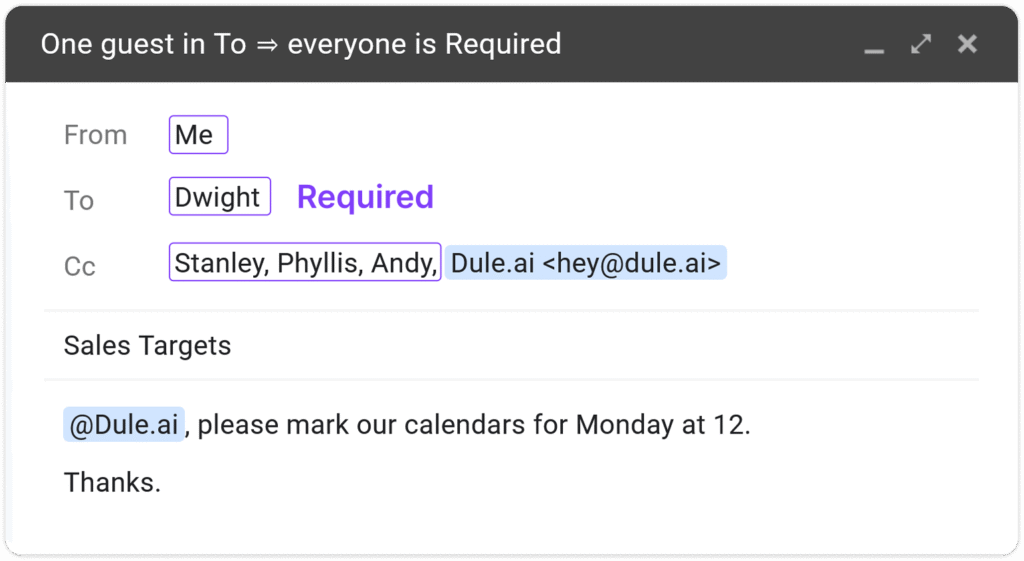
One guest in To ⇒ everyone is Required.
Two or more guests in To ⇒ everyone in Cc becomes Optional.
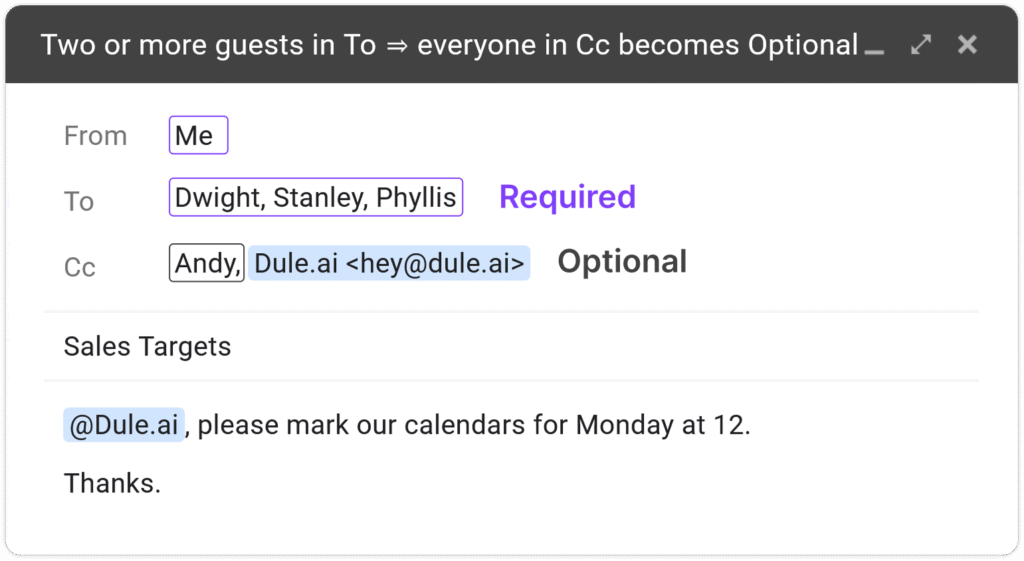
Andy is marked as an Optional guest.
Use it Free — Save Hours This Week
Cc:
One CC. Done.
How Dule Decides Who’s Required vs Optional
Dule mirrors Google Calendar’s terminology (“Required” and “Optional”) and applies two simple rules based on your email’s To and Cc fields with easy override.
| Email layout | What Dule does | Result in the calendar |
|---|---|---|
| Single address in To + one or more addresses in Cc | Treats all recipients (To + Cc) as Required | Everybody must be free for Dule to propose slots |
| Two or more addresses in To + any addresses in Cc | Marks To recipients as Required and Cc recipients as Optional | Dule finds times that work for the Required group; Optional guests can accept if the time suits them |
Tip — adjust on the fly: You’ll usually have at least one person in To. Need more observers later? Add them in Cc or just reply “Add Jordan as optional.” Want to promote someone? Type “Move Jordan to required” and Dule updates roles before anything is booked.
Why Optional Participants Matter
Not every invitee needs to block their calendar. Marking guests as Optional lets busy people stay informed without being counted toward “must-have” availability—reducing scheduling dead-ends and last-minute shuffles.
Step-by-Step: Adding Optional Participants
- Compose email → add guests, Cc [email protected].
- Rely on the To/Cc default (single recipient in To = all required; multiple in To = Cc optional).
- Add an inline command if you need to tweak roles before sending.
- Send. Dule checks calendars and replies with tailored slot options.
- Adjust on the fly. Even after sending, reply in the same thread with commands like “Add Jordan as optional” or “Move Jordan to required”. Dule updates roles and, if needed, re‑proposes times—no manual editing required
What Happens Next
- Slot proposal: Dule replies with times that fit every Required guest.
- Booking: Once a slot is selected, Dule sends a calendar invite:
- Required guests show as “Yes” (tentative until they accept).
- Optional guests show as “Optional”.
- Rescheduling: If a Required guest declines, Dule automatically re-proposes new times. Optional declines do not trigger rescheduling.
Troubleshooting & FAQs
Change roles by replying? ✉️✨
Yes—say “Make Andy optional” or “Move Kelly to required.” Dule updates roles and re-checks availability before booking.
Already sent the email? ⏪📧
Yes—adjust anytime before it’s booked; if a required guest changes, Dule re-proposes times.
How do To & Cc map? 📬➡️
One in To → everyone required. Two+ in To → To required; Cc optional.
Edit in Google Calendar? 🗓️✏️
Works too—toggle Required/Optional in the event. Dule never overwrites your manual edits
Outlook & Apple support 🍏🖥️
Works with Gmail today; Outlook & Apple Calendar are coming soon.
Free to use? 💸
Yes—available on the free plan; unlimited scheduling on paid plans.
Recap
- Speak naturally: Reply in the thread (e.g., “Make Andy optional” / “Move Kelly to required”) and Dule updates roles and re‑checks availability before booking.
- Defaults that just work: 1 in To → everyone required; 2+ in To → To required, Cc optional.
- Stay in control: You can still edit roles in Google Calendar; Dule never overwrites your manual changes.
You’re all set—enjoy cleaner invites and fewer scheduling dead-ends! Explore related guides: Auto-Coordinate, Time Zone Meetings, and the full how-to hub.
See where optional attendees matter in the comparison pages buyers read next
Optional participants are most useful in workflows where not every person on the thread should block the meeting. These comparison pages show that scheduling pattern in context.
Interview Scheduling Software
Useful when coordinators need interviewers informed on the invite without forcing every participant to count toward the scheduling decision.
Legal Scheduling Software
Relevant when some participants need visibility on a deposition or case event without being mandatory for every scheduling option.
PR and Media Scheduling Software
Helpful when spokespeople, comms leads, and observers should stay informed, but only a smaller group needs to drive the final time decision.
Healthcare Scheduling Software
Read these when one staff member needs the appointment on their radar while the patient and specialist still drive the actual scheduling decision.